Compare Steam libraries with friends
Pick a Steam friend and see your libraries side by side: the games you share, who finished what, how you both rated them and what they play that you don't.
No download, no extension. Uses the official Steam Web API.
Shared games, side by side
Every game you both own is listed with both statuses, playtimes and ratings. Filter for games you both completed or for recommendations: games one of you finished that the other has not touched yet.
- Status, playtime and rating for both players
- Filters: both completed, suggestions for each other, both playing
- Achievement comparison per game
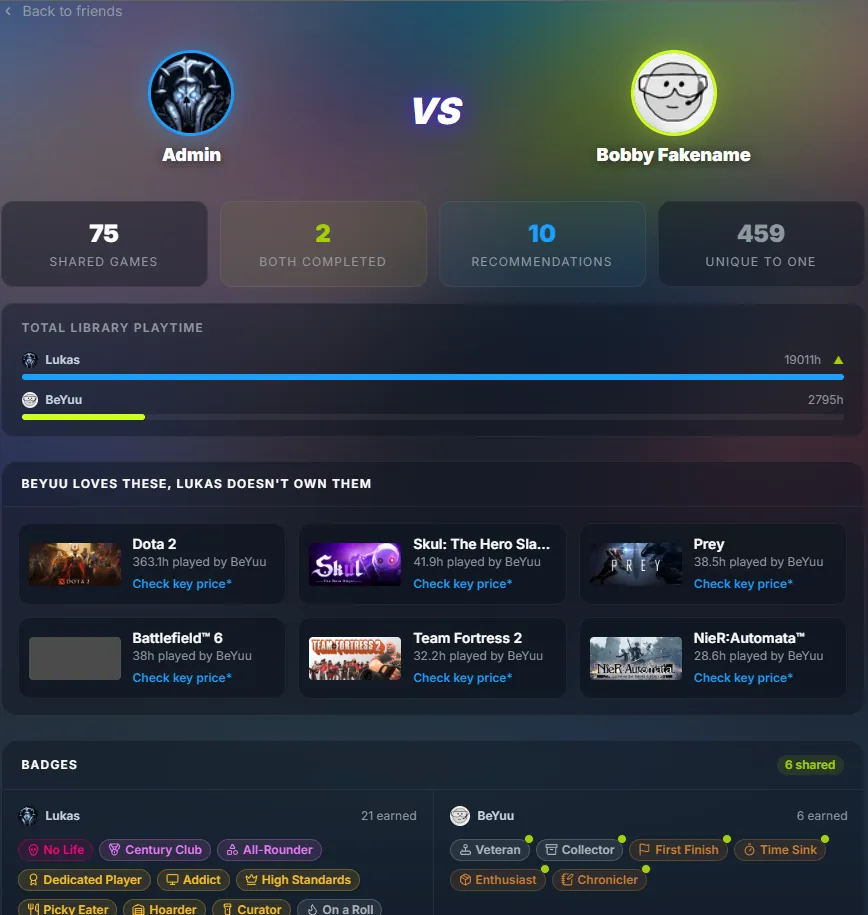
Badges and playtime
See both badge collections next to each other with shared badges highlighted, plus a total playtime comparison. Good for settling who the bigger gamer is.
- Badge comparison with shared badges
- Total library playtime bar
Bring your friends along
The compare page lists your Steam friends and shows who already uses the tracker. For everyone else there is a one-click invite text to send them.
- Your Steam friends list, searchable
- One-click invite text
- Activity feed with your friends' completions and ratings
Questions
Does my friend need an account?
Your friend needs to sign in once so their library is imported. After that you can compare at any time.
Why can't I see my friends?
Your Steam friends list has to be public. You can change that in your Steam privacy settings.
Can my friend see my notes?
Only notes you mark as public. Statuses, ratings and badges are visible on your library page.
Is comparing free?
Yes, every feature of the tracker is free.
Your library, sorted in seconds
Sign in with Steam and the tracker imports every game you own.
Sign in with Steam